
It’s 4:45 on a Thursday. The car at your pharmacy drive-thru window has been there for six minutes. Their claim was rejected, your tech is on hold with the PBM, and three cars are lined up behind them with their engines running.
Nobody in that line is waiting because your team is slow. One complicated pickup can hold up everyone behind it. Asking that patient to move helps, but now your team has another job: remembering who’s waiting and when to bring them back.
THE SHORT ANSWER
A pharmacy drive-thru stalls when one complicated pickup holds up every car behind it. To keep it moving, give those patients a clear next step out of the lane, keep track of who’s waiting, and bring them back when you’re ready to serve them.
In this article:
- Every patient deserves the time they need
- The “scan, park, pull back up” method
- Know who’s waiting without watching the parking lot
- What your drive-thru gets back
- Keep your existing drive-thru
- What it costs
- Questions from drive-thru pharmacies
Every patient deserves the time they need
You and your patients want the same thing: a quick, easy pickup. But some pickups need more time, and at the pharmacy drive-thru, every car behind them waits too.
Insurance problems
Your tech is on hold with the PBM. The patient is watching the clock, and so are the cars behind them.
The prescription isn’t filled yet
They came for three prescriptions, but only one was ready. Now your team is filling while the line waits.
A question for the pharmacist
It’s a good question, and it needs a real answer. That’s hard to give with cars stacking up.
Picking up for the whole family
Four bags, four birthdays, four copays. A big help for them, and a long stop at your window.
The drive-thru lane doesn’t always leave room for that. Now it can, with a simple scan.
The “scan, park, pull back up” method
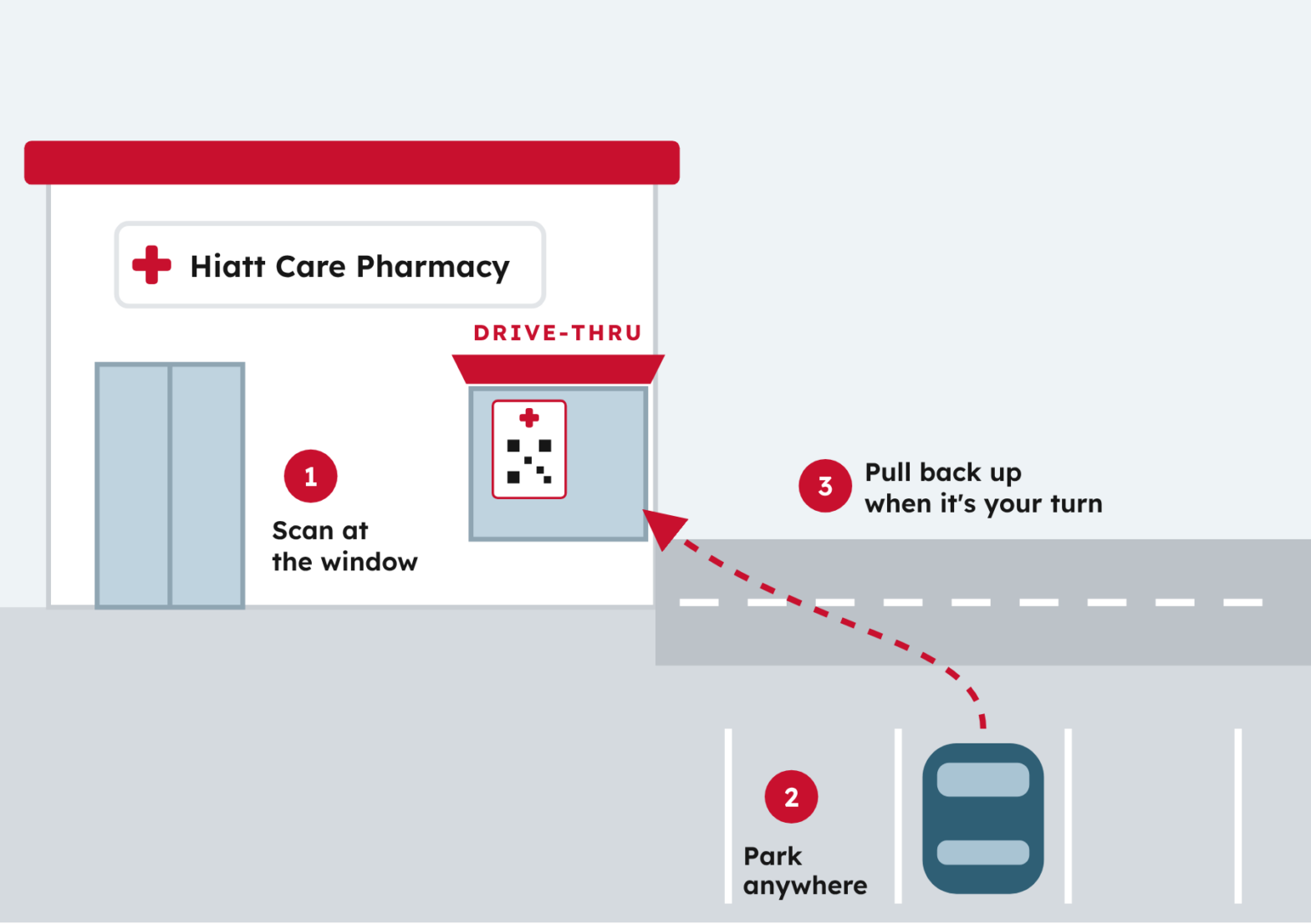
Here’s how DisplayRx works at your drive-thru. No one has to walk the lot.
1
Scan at the window
If a pickup needs more time, the patient scans the code in your window. No app or account.
2
Park anywhere
They pull out of the lane and wait in any open spot.
3
See it’s their turn
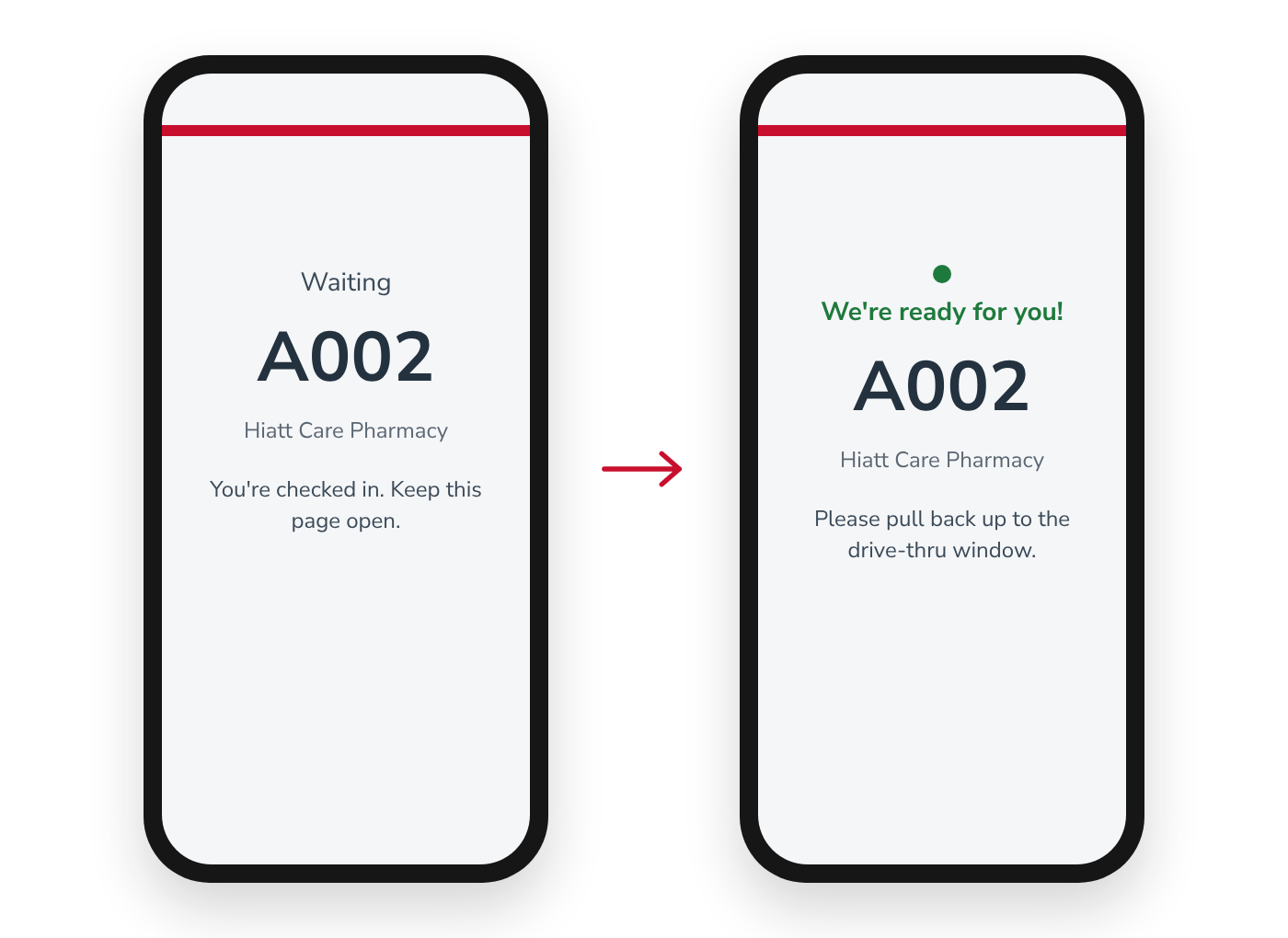
Your team taps Notify, and their phone shows “We’re ready for you!”
4
Pull back up
They return to the window. This helps free up the lane for the next patient.
WHAT YOUR TEAM SAYS AT THE WINDOW
“Yours needs a few more minutes. Scan the code in the window, park anywhere, and your phone will show you when to pull back up.”
Serve patients when you’re ready
Patients see their own status on their phone. Your team can call them when you’re ready to serve them, rather than being limited by the order cars arrived.
Know who’s waiting without watching the parking lot
The DisplayRx Work Queue shows every checked-in patient, what they came for, and how long they’ve waited. Your team notifies the next patient from one screen. There’s no need to track cars or parking spaces: the queue is based on who checked in, not where they parked.
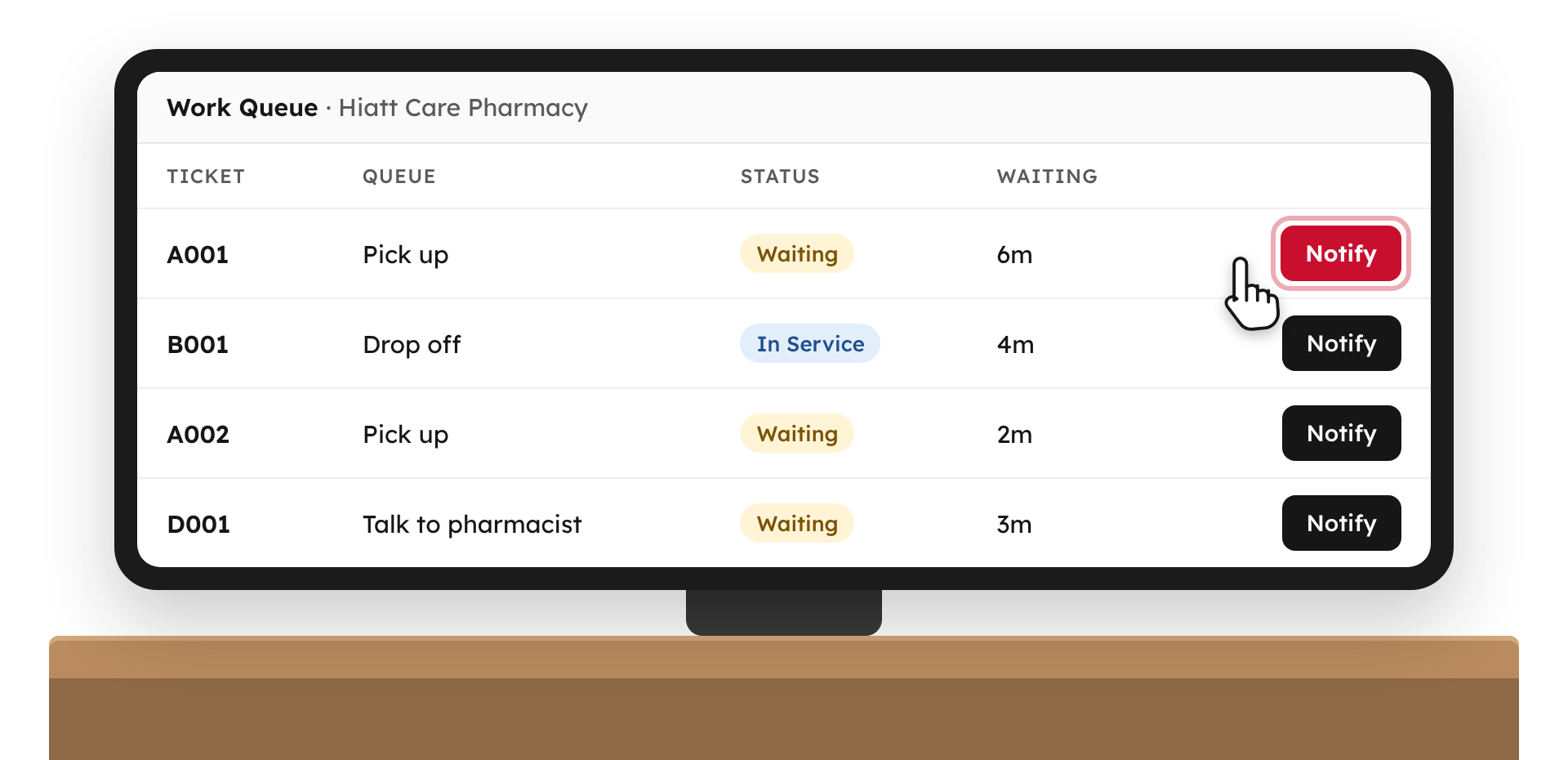
- See pickups, drop-offs, and pharmacist questions in one list.
- Know who has been waiting and for how long.
- Notify patients when you’re ready to serve them.
- Add walk-ins to the same queue.
What your drive-thru gets back
- Room for the complicated ones. Patients who need more time can get it without holding up everyone behind them.
- Your window person back. When the lane isn’t stuck, whoever is at the window can help the counter and answer the phone.
- Quick pickups that stay quick. A refill that’s been ready since Tuesday doesn’t wait behind an insurance call.
- A drive-thru that feels convenient. That’s why patients chose it in the first place.
Keep your existing drive-thru
DisplayRx works with a printed check-in poster and a browser-based Work Queue. It fits your current pharmacy workflow: no kiosk, no special parking, no new traffic pattern.
No new lanes, designated parking, or patient apps
✕ No separate pickup lane
✕ No designated parking spots or signs
✕ No staff watching the lot
✕ No patient app or account
Patients scan at the window, while stopped.
Want patients to get a text when it’s their turn?
Patients waiting in parked cars switch apps, take calls, and put their phones away. With the optional text alerts add-on, they’ll still get a text when it’s their turn, even if they’ve closed the page. Patients opt in at check-in and can reply STOP anytime.
$19 per location per month · 1,000 texts included · 3¢ each after

TRY IT YOURSELF
See what your patients will see.
Scan the code, or press and hold it on your phone, to check in at our demo pharmacy. Use any name and a made-up birthday. Open the demo check-in
What it costs
$99 per location / month
Includes phone check-in, the Work Queue, custom check-in questions, branding, and reporting.
Optional: text alerts, +$19/location/month.
14 days free. No credit card required. Your trial begins when you go live.
Integrations or multiple locations? Book a call or call us anytime at (801) 754-1297.
Questions from drive-thru pharmacies
Do we need to create special parking spots?
No. Patients park in any open spot.
Do staff have to watch the parking lot?
No. Patients come back to the window on their own when their phone says it’s their turn.
Do patients need to download an app?
No. They scan the code with their phone’s camera and check in from their browser.
What if a patient doesn’t have a smartphone?
Your team can add them to the Work Queue as a walk-in and handle them the way you do today.
Does DisplayRx tell us whether a prescription is ready?
No. DisplayRx manages check-in and lets you notify patients when you’re ready to serve them. It doesn’t fix insurance issues or speed up filling. It gets the cars waiting on those out of your lane.
What if patients close the check-in page?
With text alerts, they still get a text when it’s their turn. Without them, patients need to keep the page open.
Do patients have to be served in the order they check in?
No. Your team manages the order of service from the Work Queue and can call patients when you’re ready to serve them. Patients see their own status on their phones.
What if we send more than 1,000 texts a month?
Additional texts are 3¢ each. Text alerts are optional, and staff can choose whether to text a patient for each visit.
Is it safe to scan in the car?
Patients scan while stopped at the window, never while driving.
Do we need to replace our pharmacy management system?
No. DisplayRx runs on its own in any web browser. Connecting it to your pharmacy system is available on our Integrations plan.
When does the free trial begin?
When you go live, not when you sign up. Text alerts are on for the whole 14 days.
Give every patient the time they need, without holding up the line.
Let patients wait in a parking spot, not a line of cars. Your team sees who’s waiting and notifies them when it’s their turn.
Start my free trial Book a call
14 days free, starting when you go live · No credit card required · Questions? Call (801) 754-1297